On TikTok, the question comes up in every form: “how to make a relationship wrapped for free,” “in Canva,” “in CapCut,” “an app that adds the music for you.” The videos show the result in 15 seconds and skip the part that takes work. This guide is the written step-by-step: what to gather first, how to do it in each tool, how long it really takes and what each option gives you.
If you'd like to first understand what the Couple Retrospective is and see its screens from the inside, our Couple Retrospective guide covers it all. Here the focus is on the how-to, including how to do it without spending a thing.
Before you open any app: a 6-step plan
The most common mistake is opening the editor first and spending an hour picking fonts. Make the plan first. It works for all three options and cuts your building time in half.
- Confirm the date it all began. First date, the day you made it official or your first kiss: agree on which one counts. If you remember the time, write that down too.
- Put the photos in one album on your phone. 7 to 15 photos from different stages: your first one together, a trip, a blurry funny one, an everyday one (coffee, the couch, the grocery store). In an internal LovePanda survey (Sept 2026), the median is 7 photos per gift. You don't need 50.
- Pick a song with a story. The one from your first date, the one playing in the car, the one one of you sent the other at 2 a.m. No ideas? See these songs for a relationship wrapped.
- List 5 moments with dates. First date, first trip, the day you met the family, the first fight that turned into a joke, your latest night out.
- Write down 3 numbers. Days together, cities you've visited, how many times you've ordered the same pizza. Numbers are what make it feel like a wrapped.
- Write the closing message. 4 to 8 lines. If you get stuck, use this formula: one specific memory, what it changed in you, a plan for the months ahead.
Write the plan in your phone's notes app, in the order the screens will appear. Once it's done, any tool is just a matter of filling it in.
Option 1: how to make a relationship wrapped in Canva
Canva is the way to go if you want to post a carousel or Stories. It works on your phone, has a no-cost version and plenty of ready-made recap templates.
- Create a design in the Instagram Story format (vertical, 1080 × 1920). It's the right size for Stories, Reels, TikTok and WhatsApp status.
- Search templates with terms like “recap,” “wrapped” or “year in review.” Go for the ones with solid-color backgrounds and big type: that's what gives it the wrapped feel.
- Make one screen for each item in your plan: cover (names and year), day one, one moment per screen, the numbers, the song and the closing message. Somewhere between 8 and 14 screens is a good length.
- Swap in your photos and keep one idea per screen: a big number or title on top, a short caption below.
- Export as PNG for a carousel (Instagram allows up to 20 images per post) or as a video for Stories. To add music, pick the track in Instagram or TikTok itself when you post.
Real time: 1 to 3 hours, mostly choosing photos and tweaking text. Result: good-looking images to post. What's missing: the numbers are static (you work them out by hand), there's no interaction and, outside social media, the music doesn't travel with the images.
Option 2: how to make a relationship wrapped in CapCut
CapCut is for when you want a video with music and transitions, the format that does well on TikTok and Reels. You can use a template or build it from scratch.
With a template (faster)
- Open the Templates tab and search “relationship recap,” “couple” or “2026 recap.”
- Before choosing, check how many photos the template needs and whether it uses vertical photos.
- Tap Use template, select your photos in the order of your plan and let the app fit them in.
- Edit the text, watch it from start to finish and export in 1080p.
From scratch (more personal)
- Create a project in 9:16 and import your photos in the order of your plan.
- Give each photo 2 to 3 seconds. The most important moments can get 4.
- Add the song and trim it to start on a strong part, usually near the chorus.
- Adjust the photo timing so they change on the beat.
- Add a short line of text to each photo, always in the same spot and the same font.
- Export it and, if you're sending it in a messaging app, send it in HD or as a file so it doesn't lose quality.
Real time: 30 to 60 minutes with a template; 1 to 2 hours from scratch. Result: a 1- to 3-minute video with music. What's missing: the video stays the same forever (the numbers don't update), your partner doesn't interact with anything and some templates and effects are paid.
If you're posting it, choose the song inside TikTok or Instagram. Tracks added outside the app can get muted for copyright after you publish.
Option 3: a ready-made retrospective, with music in the link
If the idea is to give it as a gift (something your partner opens on their phone, with your song playing), the ready-made option does what Canva and CapCut can't. With LovePanda's Couple Retrospective, you answer 5 questions, one per screen, and the retrospective builds itself in a stories format inspired by Spotify Wrapped — with no affiliation with Spotify: the music comes from YouTube, chosen by you.
- Type your name and your partner's.
- Add the day you got together (the time is optional; if you don't remember the exact day, the month and year are enough).
- Search for the song by title or artist. It plays inside the gift.
- Choose 1 to 6 photos — the first one becomes the cover.
- Write your letter, from scratch or starting from a suggestion.
- If you want, add extra chapters: Timeline, Camera roll, the sky that night, Your places, Secret word, Surprise wheel or Christmas.
- Check the preview, choose a plan and pay once, by card or digital wallet. The link and QR Code arrive as soon as the payment is confirmed.
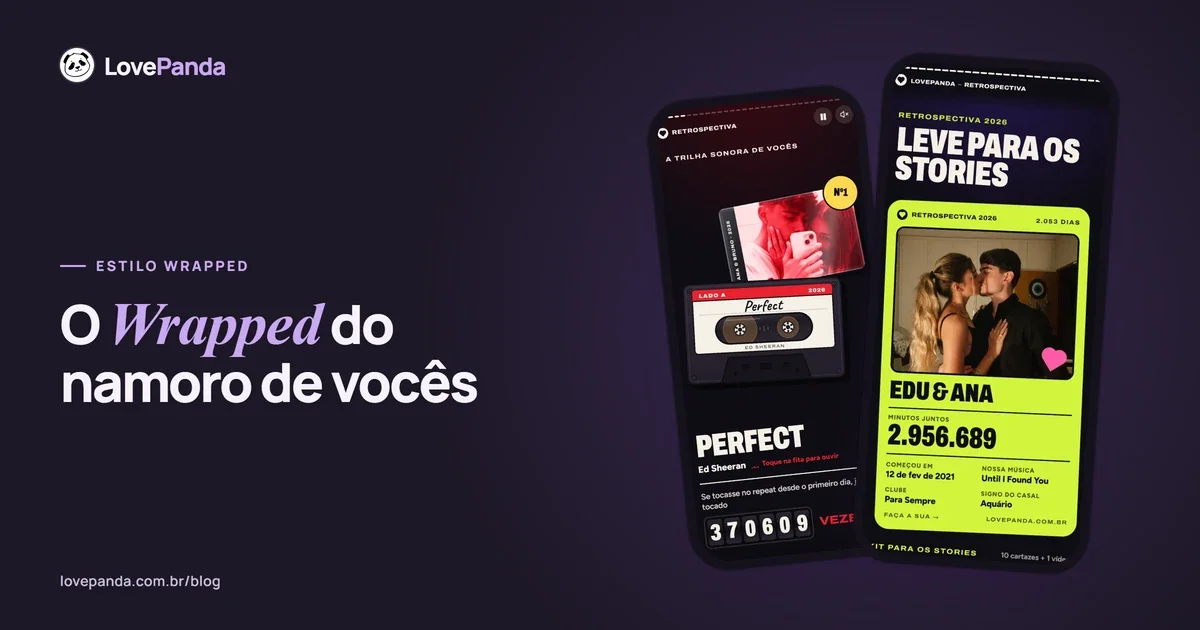
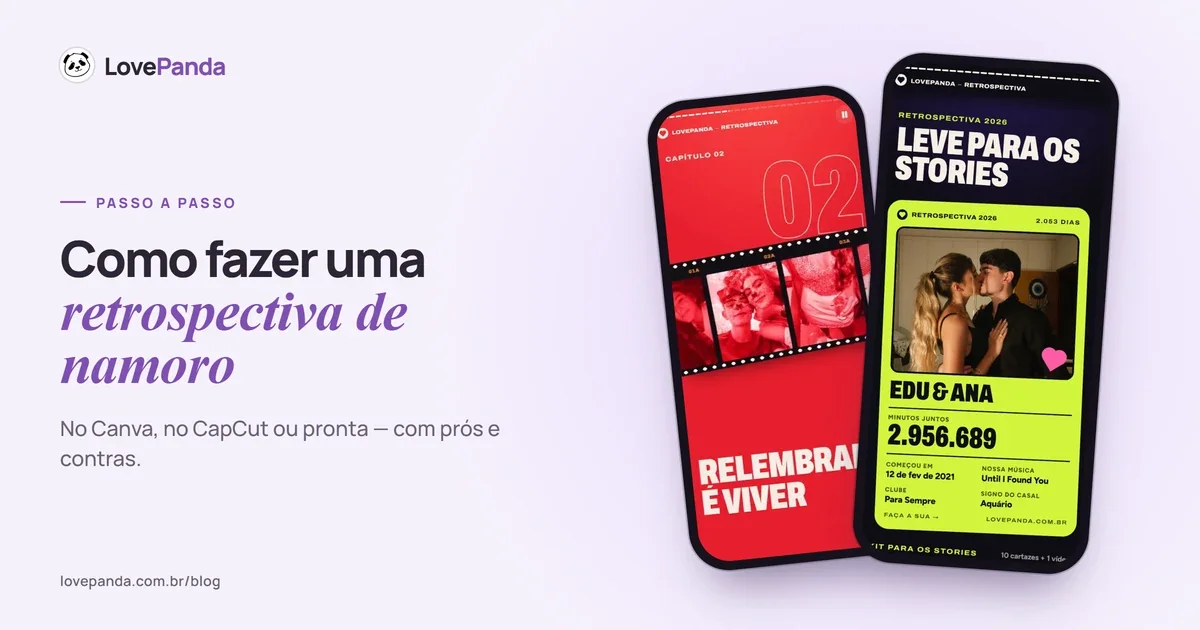
From those answers, 15 screens build themselves: the opening with your record spinning; the minutes together counting up live; your love in numbers (days, weekends, full moons, heartbeats); your song on a cassette tape, with how many times it would have played on repeat since day one; the guess-day-one quiz; day one on a calendar and the moon that night; the season and your relationship sign; the Forever Club membership card; your couple milestones in a passport and the next milestone on a departures board; your wax-sealed letter; the closing screen; and a summary image to post to Stories.
The opening
Your story starts like a release: your record spinning, with your names on the cover.
Real time: however long it takes to choose the photos and write the letter; the rest is filling in blanks. Result: a gift that opens in the phone's browser, no app to install, by link or QR Code. Your partner moves through it like stories: tap to go forward, hold to pause. Honest limits: it's paid, it isn't a video file (it's a web page) and, on some phones, it takes a tap for the sound to start.
Canva, CapCut or ready-made: which should you choose?
| Criteria | Canva | CapCut | Couple Retrospective |
|---|---|---|---|
| Cost | No cost for the basic version | No cost for the basic version; some templates are paid | One-time payment, starting at the price shown on the pricing page |
| Time | 1 to 3 hours | 30 minutes to 2 hours | However long it takes to choose photos and write the letter |
| Music | Only if you post with the app's music | Inside the video | Plays in the gift, from a YouTube video |
| Relationship numbers | You calculate and type them | You calculate and type them | Calculated from your date and counting up live |
| Interaction | None | None | Tap-through stories, the day-one quiz and chapters like Secret word and Surprise wheel |
| Delivery | Images or a post | Video file | Link or QR Code |
| Best for | An Instagram carousel | A TikTok or Reels video | A gift to open on a phone |
Bottom line: if the goal is to post, Canva and CapCut get it done without spending anything. If the goal is to give a gift, the ready-made version wins on music, interaction and the detail that your time together keeps counting after you hand it over. And you can have both: deliver the gift by link, then post the summary image to Stories. Want other no-cost options, like a playlist or a slideshow? See these ideas for a digital gift that costs nothing.
On the Retrospective, the For 24 hours plan stays online for 24 hours, counted from activation, and Forever never goes offline. Complete adds visit alerts by email to everything in Forever, plus a printable couple's card in 4 styles, high-resolution prints of your photos and the QR Code art — all as digital files. The 24-hour plan can be upgraded to Forever later from your dashboard. Current prices:
Each plan's price is on the pricing page and is confirmed before payment. It is a one-time payment, not a subscription.
How many photos, which song and how long should it be?
- Photos: 7 to 15 tell the story without dragging. In a video, more than 20 starts to feel long.
- Video length: 1 to 3 minutes. A full song runs 3 to 4 minutes; if you go past that, cut.
- Time per photo: 2 to 3 seconds in a video. In stories, keep the text on each screen short so there's time to read it.
- Music: one song, with a story. If you want to shift the mood halfway through (from funny to emotional), two at most.
- Text: up to 12 words per screen. Nobody reads a paragraph in a story. For ready-to-use captions, see these relationship wrapped quotes.
12 screen ideas for any relationship wrapped
- Cover — your names and the year in big letters: “Ana & Leo, 2026.”
- Day one — the date, the day of the week and where it happened.
- The first screenshot — your first conversation, awkward “hey” and all.
- The numbers — days together, cities visited, shows binge-watched.
- Song #1 — the song's cover art and one line about why it's yours.
- Top 3 moments — in order, like a ranking.
- The worst photo — every couple has one; it's the screen that gets a laugh.
- Your spot — the bar, the park, the usual beach.
- The inside joke — a word only the two of you understand.
- Achievements — the first trip, the first holiday dinner with the family.
- The quiz — “what day did it all begin?”, with three date options.
- The ending — your message and a plan for next year.
Want to build it month by month? The romantic retrospective template has one screen for each month of the year. And if the style you're after is the colorful screens with big numbers and “top %,” see how to make a Spotify Wrapped for couples.
How to calculate your relationship numbers
In handmade versions, the numbers are the most impressive part and the easiest to get wrong. The basic math:
| Number | Math | Example after 1 year together |
|---|---|---|
| Days together | Difference between the dates (use a date calculator) | 365 days |
| Minutes together | Days × 1,440 | 525,600 minutes |
| Weekends | Days ÷ 7 | 52 weekends |
| Full moons | Days ÷ 29.5 | 12 full moons |
| Heartbeats | Minutes × 72 (average resting rate) | About 37.8 million |
| Times the song would play on repeat | Minutes ÷ song length | About 150,000 (for a three-and-a-half-minute song) |
In the Couple Retrospective, this math is done from the date you enter, and the minutes keep counting up live while your partner watches. The milestones (7 days, 1 month, 100 days, 6 months, 1 year, 500 days, 1,000 days and so on) show up with the real date each one happened, and a board shows how many days are left until the next one.
How to deliver your relationship wrapped
- At the time it all began — if your first kiss was at 11 p.m., send it at 11 p.m.
- With the QR Code on a card — print it, write “point your camera here” and hand it over with a treat. More ideas in gift with QR Code.
- On a video call — for long-distance couples: open it together, each on your own phone. See also long-distance gift ideas.
- On the same day — the ready-made version doesn't depend on shipping: the link and QR Code arrive as soon as the payment is confirmed. For your date, see monthiversary gift and anniversary gift ideas.
- At the place of your first date — plan to go there and ask them to open it when you arrive.
- A video by text — if you went with CapCut, send it in HD or as a file.
How to make a relationship wrapped: FAQ
Whichever way you go, what makes a relationship wrapped work is the plan, not the tool. If you'd like to see a finished one before deciding, open the real Retrospective example.

Written by
Equipe LovePanda
Especialistas em Presentes Digitais
A Equipe LovePanda escreve sobre os presentes que desenvolve: Retrospectiva e Álbum do Casal. Compartilhamos orientações de personalização, diferenças entre os formatos e ideias para entregar uma surpresa com a história de vocês. A LovePanda é a maior plataforma de presentes digitais do Brasil, com mais de 200.000 presentes criados desde 2024.
Explore our gifts
Discover our personalized digital gift options