 Equipe LovePanda
Not every month has room for a paid gift, and it doesn't need to. A digital gift you make yourself, with the right photos and an honest letter, can mean more than plenty of store-bought things. What usually gets in the way is something else: not knowing where to start, spending two hours fighting with an editor and ending up with something that looks like a school project. This guide fixes that.
Below: what to gather first, the general step-by-step, eight no-cost formats with instructions for each, a table to help you choose, tips so it doesn't look improvised and, honestly, when it's worth paying for a ready-made gift.
Before you start: what to gather (for any format)
- Photos — between 5 and 15. In LovePanda internal data (Sept 2026), the median is 7 photos per gift: you can tell a good story with just a few. Include your first photo together, a funny one and one from an ordinary day.
- The song — the one from your first date, the one from car rides, the one that turned into an inside joke.
- Three specific memories, with a place and a detail: “the rain at the bus stop after the movie,” not “that beautiful day.”
- The date it all began — to count your days together.
- A short letter — two paragraphs are enough. If you get stuck, use the method in how to write a love letter.
How to make a free digital gift: the general step-by-step
- Pick the format that fits them — if they love music, a playlist; if they like to read, a letter or a slideshow; if they live on Instagram Stories, a video.
- Sketch the sequence on paper — the beginning (how you met), the middle (moments and inside jokes) and the end (the letter and an invitation).
- Build it in the tool you chose — start from a template and swap the colors and fonts for something that feels like the two of you.
- Check it on your phone — that's where they'll open it. Make sure no faces got cropped and the text is easy to read.
- Check the sharing settings — the link has to be open to anyone who has it; otherwise they'll hit a “You need access” screen.
- Deliver it at the right moment — at midnight, at the time of your first date or as a printed QR code inside a card.
8 ways to make a digital gift for free
1. A photo slideshow in Canva
Canva has a free plan with ready-made presentation and photo album templates. It's the prettiest result for the least design effort.
- Choose a presentation template and delete whatever you won't use; 8 to 12 pages is a good length.
- Use one photo and one line per page. The last page is the letter.
- Share it with a view-only link or download it as a PDF.
- If you want sound, you can add audio and even export it as a video, but the free plan's audio library is limited and may not have your song.
Good for: anyone who wants something pretty and has no time to learn an editor. Watch out: some elements and templates are paid and marked with a crown.
2. A memory book in Google Slides
Google Slides comes with any Google account and has a little-known feature: publishing the presentation to the web with auto-advance, like a slideshow movie.
- Build the slides with your photos, a short caption on each and the letter at the end.
- Under File › Share › Publish to web, choose the time between slides and set it to start automatically.
- For sound, insert an audio file from your Google Drive and set it to play automatically. On phones, though, the sound doesn't always start on its own.
- Send the published link, not the editing link.
Good for: people who already use Google's tools and want full control. Watch out: on a phone the presentation opens small and the audio may fail, so test it first. If you're after something closer to a website, see our guide to a website for your girlfriend.
3. An annotated playlist
A playlist on Spotify, YouTube Music or Apple Music becomes a gift when it has an order and an explanation.
- Add 10 to 15 songs in chronological order: the one from your first date, the one from your first trip, the one that played during a silly fight and became a joke.
- Swap the cover for a photo of you two (on Spotify, you can change the image when you edit the playlist details) and give it a name only the two of you will get.
- Use the description for one key line and, along with the link, send a message explaining why each song is there.
Good for: couples who talk through music. Watch out: they have to open it in the app or the browser, and a playlist can't hold photos or a long letter.
4. A photo video in CapCut
CapCut is a video editor with a free version for phone and computer, and templates where you just swap in your photos.
- Use 15 to 20 photos and aim for 60 to 90 seconds; long videos drag.
- Add text at three or four moments, not on every photo.
- End with a line of your own on screen, over a plain background.
- If you send it over WhatsApp, attach it as a document so the video keeps its quality.
Good for: anyone who wants something quick to watch and knows their way around a phone. Watch out: some templates and effects are paid, so check before you build the whole thing. And a video is only for watching: there's nothing for them to explore. If what you have in mind is specifically a relationship retrospective, see our guide to the couple retrospective.
5. A shared album in Google Photos or iCloud
The simplest option of all: a shared album with the photos in the order of your story and a caption on each one.
- Create the album, pick the photos and write a short caption for each.
- Share the link and let them add photos too: it becomes a living album of the two of you.
Good for: long relationships with lots of photos piled up. Watch out: it looks like a gallery, not a gift; it works best alongside a letter.
6. A PDF letter with a QR code
Write the letter in Google Docs with two or three photos, export it as a PDF and save it to Google Drive. Then generate a QR code that points to the link and print it on a card.
- In Drive, set the file to “Anyone with the link can view.”
- To make the QR code, Chrome on a computer can generate one for any page; QR generator sites work too.
- Go for a static QR code. Some generators create dynamic QR codes that stop working when the free trial ends.
- Test the printed QR code with two different phones before you hand it over.
Good for: giving it in person, inside an envelope. Watch out: a PDF is static and has no music.
7. A couple quiz in Google Forms
A quiz with questions about the two of you — “where was our first kiss?”, “what was the first show we watched together?” — with your letter appearing at the end.
- In the form's settings, turn it into a quiz so it shows the right answers.
- Write 8 to 10 questions, mixing easy ones with things only your partner would remember.
- Put your letter in the confirmation message: it appears when they submit their answers.
Good for: competitive couples with a sense of humor. Watch out: it looks like a form, so put the effort into the writing.
8. An email scheduled for the right moment
The simplest letter of all, with one detail that changes everything: arriving at the exact minute. In Gmail, the schedule send option sits right next to the Send button.
- Write the letter, attach two photos and schedule it for midnight on their birthday or for the time you got together.
- Use a subject line that makes them want to open it: “Read this before bed.”
Good for: people who write well and want the effect of perfect timing. Watch out: email competes with promotions in the inbox, so text them to say something just arrived.
Which format should you choose? A quick comparison
| Format | Approximate time | Music? | Best for |
|---|---|---|---|
| Canva | 1 to 2 hours | With limits | Something pretty without design skills |
| Google Slides | 1 to 2 hours | Sometimes; it may fail on phones | Anyone who wants full control |
| Annotated playlist | 30 min to 1 hour | Yes, it's the music itself | Couples who talk through music |
| CapCut video | 1 to 3 hours | Yes | Something quick to watch |
| Shared album | About 30 min | No | Relationships with lots of photos |
| PDF letter with QR code | About 1 hour | No | Giving it in person, in an envelope |
| Google Forms quiz | About 1 hour | No | Couples with a sense of humor |
| Scheduled email | 30 min to 1 hour | No | Arriving at the exact minute |
These times assume you already have the photos picked out. If you don't, add another hour: it's always the slowest part.
What about gift sites with a free plan? They exist, with limits. On the public pages LovePanda checked on September 25, 2026, the free versions we found came without a sharing option, with ads or lasting only 24 hours. If you use one, check those three points before you build the whole thing.
Tips so the gift doesn't look improvised
- Detail beats production — a caption like “the day we missed the last bus” is worth more than any animated transition.
- Start and finish strong — the first screen is your oldest photo; the last is the letter.
- No public posts — a gift is for one person. A story open to everyone turns into a show.
- Double-check names, dates and permissions — the most common mistake is sending a link that asks for access.
- Deliver it with a little ceremony — a QR code printed on a card makes even the simplest gift feel planned. See ideas in gift with a QR code.
When is it worth paying for a ready-made gift?
A homemade gift wins on cost and freedom. A ready-made one wins on polish and build time. A paid gift is worth considering when:
- It's a big date — a first anniversary, Valentine's Day, asking them to make it official, a wedding anniversary.
- You want the song playing inside the gift, alongside the photos, without depending on another app.
- You want what a generic tool can't do — your minutes together counting live, the moon on the day it all began, a quiz about day one, pages that turn like a book's.
- Time is short — you'd pick the photos and write the letter anyway; the ready-made design saves you the building part.
- You want it to be kept — with its own link, a QR code and a plan that stays online forever.
That's what the Couple Retrospective and the Couple Album are for. The Retrospective turns your photos, your song (from a YouTube link you choose) and your date into stories: your minutes together on an odometer, your love in numbers, your song on a cassette tape, the day-one quiz, the moon that day, your milestones in a passport and your letter under a wax seal. The Album becomes a book to flip through, with your letter in an envelope and sections like “open when…” letters.
| What changes | Made by you | Ready-made LovePanda gift |
|---|---|---|
| Cost | Just your time | One-time payment: Retrospective from $4.90, Album from $9.90 |
| Design | You build it from templates | Ready-made; you pick the sections and fill them in |
| Music | Depends on the tool | Plays inside the gift |
| Interaction | Limited | Stories you tap through, games and pages that turn in 3D |
| Time together, live | No | Yes |
| Delivery | The tool's link | Its own link and QR code |
| How long it lasts | As long as the file exists and stays shared | Retrospective: 24 hours or forever; Album: forever |
To be clear: LovePanda isn't free. You build the gift and see the preview before you pay; it's a one-time payment, with no subscription. Current prices are on the pricing page.
See what a ready-made gift looks like inside
If you'd like to compare it with what you'd make at home, explore a few real screens below. The secret word, for example, is a Wordle-style game built around a word only the two of you understand. To see a full gift, open the sample Retrospective.
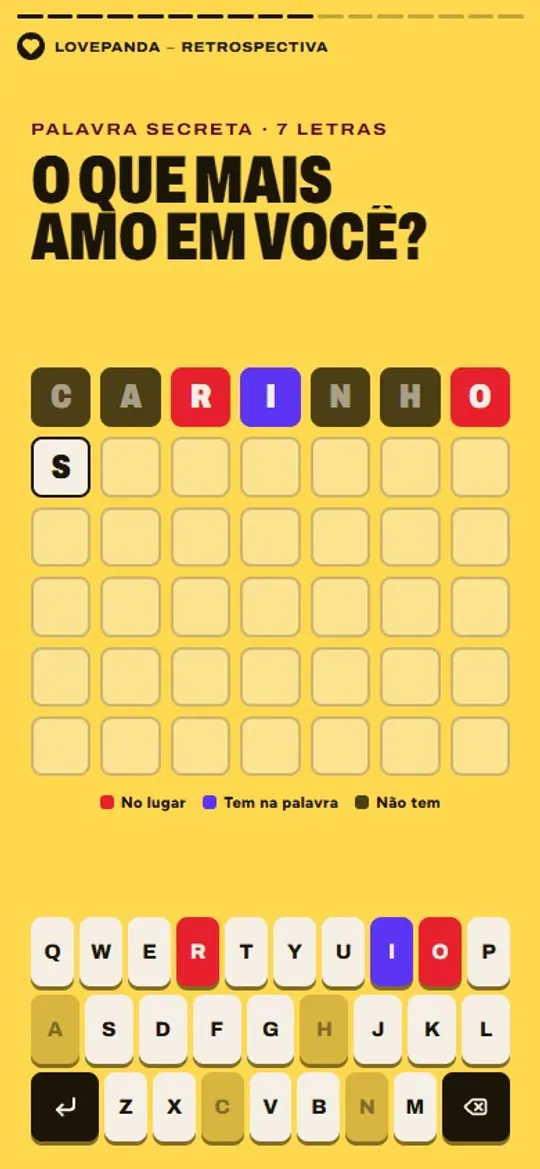
The secret word
A game to guess the word you picked, with a note at the end.
Frequently asked questions
Whichever route you take, the gift starts in the same place: with the photos only you two have and a letter written your way. The tool comes second.
Explore our gifts
Discover our personalized digital gift options
